Package Integration
This document describes how to manage packages in packages.json.
Preface
IPubCore Website
The IPubCore website is IMakeCore's website for searching and downloading packages, located at http://115.191.52.106/.
Previously, this website was bound to the address https://pub.iwebcore.org. This server has expired, so we are currently using an IP address for data processing, which does not affect user usage.
IPubCore is built using the backend of IWebCore's IHttpCore framework and the frontend of React. Here, we recommend users to use IHttpCore to write their own HTTP servers.
Users can search for various packages on this website. Once a package is found, users can write the package name and version into the packages.json file. IMakeCore will automatically download the package and integrate the specified version.
The IPubCore website interface is shown below:
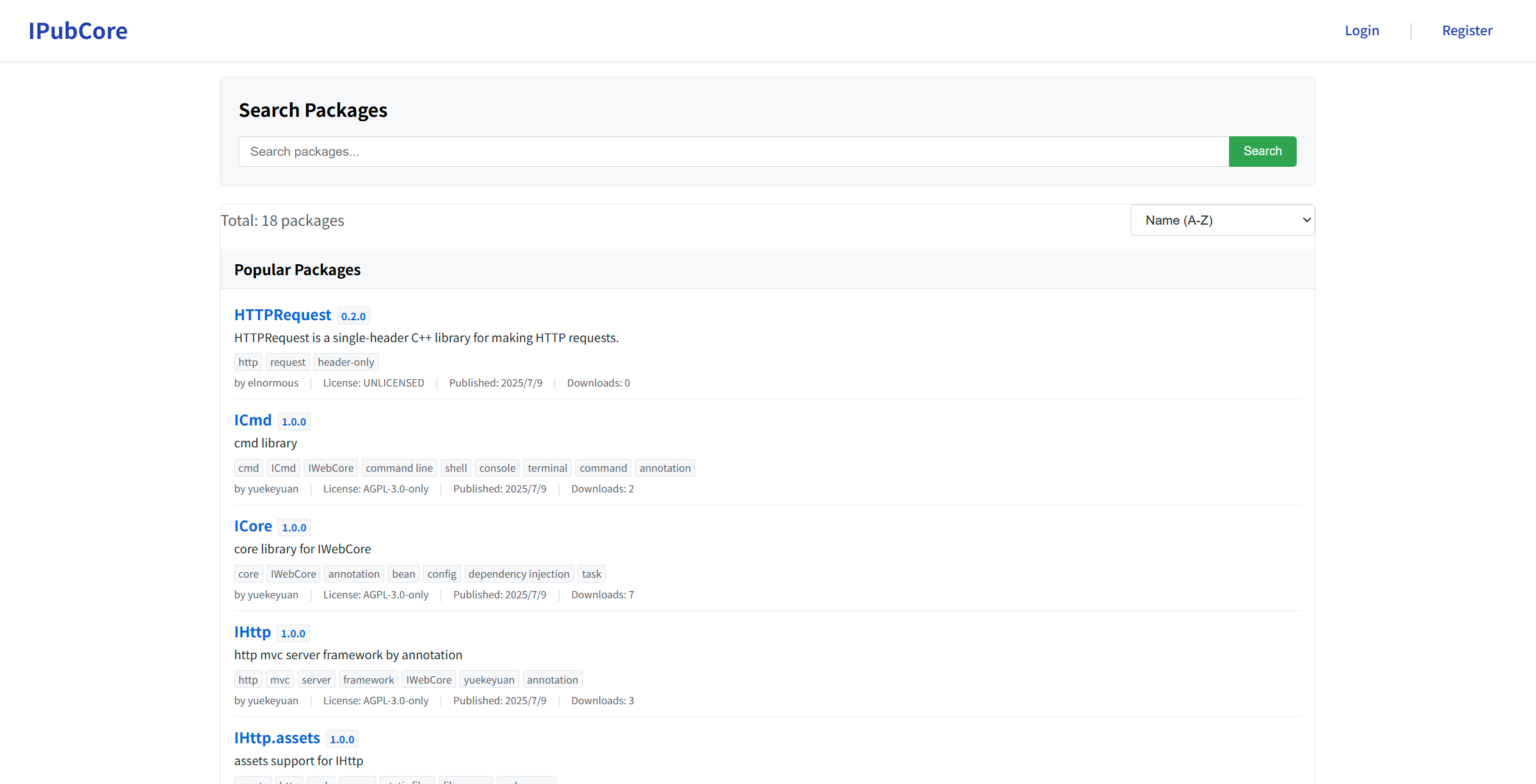
Users can search for packages they use here afterward.
If a package cannot be found and the package exists in source code, you can contact me via email at yuekeyuan001@gmail.com to request that I package it and upload it. Of course, users can also upload it themselves or package it locally.
For more help documentation on IPubCore, please refer to IPubCore.
ipc Command-Line Tool
The ipc command-line tool is a command-line utility for managing IWebCore projects. For IMakeCore, it provides functionality such as initializing IMakeCore, managing packages, and handling user operations.
The ipc tool is developed using the ICmdCore framework within IWebCore. We recommend users to use the ICmdCore tool for writing their own command-line tools, as it is very convenient and user-friendly.
For example, to search for a package, users can use the ipc search command.
To add a package, users can use the ipc add command. To remove a package, use the ipc remove command. To update a package's version, use the ipc update command. To view all packages, use the ipc list command.
Of course, the most convenient way to modify packages within a project is to directly edit the packages.json file.
How to Integrate a Package
All packages must be defined in the packages field of the packages.json file. Their definition is as follows:
name : version
The simplest way to integrate a package is by using the name : version format. This specifies the version of the package. If the local environment does not have this version of the package, IMakeCore will attempt to pull it from the server. If the server pull fails, the configuration for this version of the package will fail. Users need to verify whether the package and version exist.
The version format is xxx.xxx.xxx. For example, 1.0.0. Other forms, such as beta, are not currently supported.
The usage is as follows:
name : *
This format does not specify a particular version of the package.
When IMakeCore loads this package, it scans all locally available packages. If it finds the package, it loads the highest version available. If the package is not found locally, it downloads the latest version from the server and loads it.
There is one thing to note here: if users use * to import a package, they cannot guarantee that the desired version is loaded if they have specific version requirements. If users want to use the latest version, and the locally available version is not the latest, the loaded version will not be the latest either. Users need to specify a version number to load the latest version, or use ipc update to update the local package to the latest version for loading.
name : x
Here, x is the character x ['eks]. Users can also use uppercase X for writing.
If a package is marked as x, it will be filtered out during package loading and will not be loaded.
The purpose of IMakeCore defining x is because JSON files do not support commenting out packages to exclude them. If users want to temporarily exclude a package, they can use x as the configuration item for that package.
More Complex Package Configuration
The above describes simple key-value configurations where the value is a string and can be written in a single line.
IMakeCore supports more complex configurations, allowing users to configure additional information for a package. In this case, the value of the key-value pair is no longer a string but an object, as shown below:
In the above configuration, users can specify complex content to meet their personalized configuration needs.
Let's explain what each attribute in the object means below.
version
The version here is generally the same as the version in the simple package configuration that can be written in a single line. Users can set a specific version, use * to indicate that any version is acceptable, or use x to indicate that the package should not be parsed or loaded into the project.
version is a required field. Users must declare the version of the package, even if it is * (any version).
path
The value of path is a string.
Here, path is the local path of the package. If users configure a local path, IMakeCore will load the package from the local path. If the package is not found in this path, a package loading error will occur, and users need to manually check if the package still exists and whether its version matches the declared version.
The path field can be omitted. If omitted, IMakeCore will use alternative paths for loading.
If users specify a path, it has the highest priority, and IMakeCore will only query the package from this path.
url
url can be a string representing a URL path, or an array of strings representing a series of paths.
Here, url is the download address for the package. If users do not configure a local path or cannot find the package locally, IMakeCore will use the URL path sequence provided by the user to download the package and attempt to parse and load it.
If multiple URLs are specified, and a package is downloaded from the first URL but does not match the configured package, IMakeCore will not attempt to download and parse subsequent URLs but will directly report an error. Users need to manually check the package configuration in this case.
The url field can be omitted.
forceLocal
The value of forceLocal is a boolean type, defaulting to false.
If forceLocal is set to true, it indicates that the package must be loaded from the package folder under the project path. If the package is not found in the project path's package folder, IMakeCore will copy the package to that path and proceed with loading.
The default package folder under the project path is the .lib folder. Users can also configure other paths in the packages.json file.
There are two main reasons for the existence of the forceLocal field:
- Users want to make changes to a package to meet their requirements. If changes are made directly to the package, it may pollute the package and cause issues in other projects. Copying the package to the project path avoids this problem.
- Users want to copy and share the project, and the target location may not have IMakeCore installed, may be offline, or users may want to directly copy and compile. Copying the dependent packages to the project folder is an effective method in such scenarios.
The forceLocal field can also be configured in the public domain of packages.json. For specific usage, refer to forceLocal.