IPubCore Package Server
This document describes the usage of IPubCore.
Aside
The design goal of the entire IWebCore framework is to be comparable to the Spring platform. IMakeCore is designed to be comparable to package management tools like Maven/Gradle. Therefore, besides the built-in packages of MakeCore, users should also be able to automatically download packages from remote locations to their local machine for compilation and execution together with the project.
During the development of IWebCore, a package management server was also developed to work alongside the local service of IMakeCore. Users can configure packages from the package management server, and IMakeCore will automatically download these packages and integrate them into the project.
The previous address was https://pub.iwebcore.org, which had a proper domain name, and the HTTPS was already set up. Initially, due to too many personal matters, I did not manage this content well. First, the HTTPS expired, then I could not afford to renew the server. I switched to a domestic server costing 99 yuan per year. However, domestic servers cannot bind .org / .io type domains. The previous .com domain was also hijacked, so now the website is operating without a domain name. Users can access the IPubCore website directly using the IP address (115.191.52.106).
Moreover, operating a content-based website is not just about putting the website online; it also requires consideration of the legality of user-uploaded content. This involves a significant amount of effort, and I do not have the resources to manage this. Therefore, users can register but cannot upload their own packages. If you wish to upload a package, please contact me.
Here is the main content:
IPubCore Website
The IPubCore website is a platform for IMakeCore to search for and download packages. The address is IPubCore. The IPubCore website is built using the IHttpCore framework backend and a React frontend. Here, I recommend users to use the IHttpCore framework to write their own HTTP servers.
Users can search for various packages on this website and add the package name and version to the packages.json file. IMakeCore will automatically download the package and integrate the specified version.
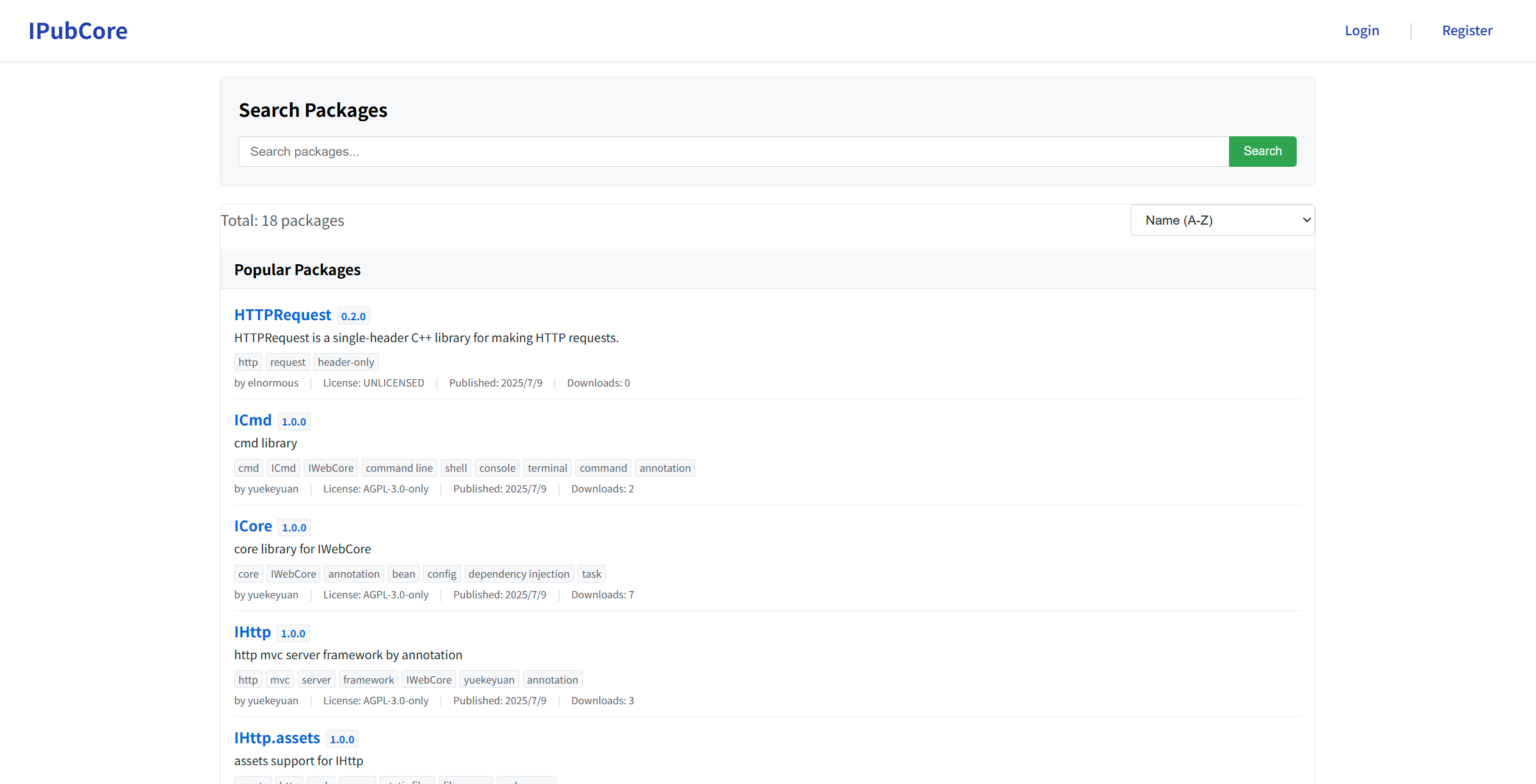
The interface of the IPubCore website is shown below:
Finding and Using Packages
Users can input keywords on the search page to search for packages. Clicking on a found package allows users to view its detailed information.
Registration and Login
Users can register and log in via the Login / Register buttons in the top-right corner of the website.
How to Publish Packages
Email Verification
Publishing a package requires email verification.
Due to website management reasons, users cannot upload packages by default and must apply to the administrator for permission. The administrator will review the application and grant the corresponding permissions. To contact the administrator, users should send an email to the Administrator Email using the registered email address for confirmation.
When sending an email, users must include the following content:
I sincerely apologize, but due to my busy schedule (I am currently working on the entire system and also job searching, so I am very busy), I have not had the time to fix this issue. (The missing functionality is minimal, but I simply don't have the time.)
Packaging
Currently, users need to manually package their packages. In the future, the packaging and upload functionality will be completed by the ipc tool.
Users should create a standalone package that can be loaded into the project. Simply use the zip tool to package it into a .zip file. Note that during packaging, the package.json file must be placed in the root directory of the zip file and cannot be nested within a subdirectory.
For guidance on defining a package, please refer to the Define Package documentation.
Publishing a Package
After logging in, users can click their username in the top-right corner, then click the My Package button in the pop-up menu, which will redirect to the Package Management page. On this page, clicking the upload package button will lead to the Package Upload page, where users can drag and drop the packaged package to upload it.
Users must verify their email before publishing a package.
During the upload process, the package information will be validated. If the validation fails, please modify according to the feedback.
ipc and IPubCore
Users can operate IPubCore content using the ipc tool.
Search
The ipc search command can search for packages on the network. The following content shows the search results for JSON-related packages:
Installing Packages
If users wish to install a remote package, they generally only need to add the desired package to the project's packages.json file. Alternatively, they can use the ipc package install command to install a package. The usage method for ipc package install is as follows:
This command accepts two parameters: one is the package name, and the other is the version. The version can be omitted, in which case the latest version will be requested. Therefore, if a user wants to install the package yuekeyuan/yyjson found in the search results above, they can use the following command:
At this point, the package yuekeyuan@yyjson is installed.