Skip to content

Using Example 1: Integrating json

In this document, we will create a Demo that calls the built-in nolhmann/json library from IMakeCore.


nlohmann/json Library

The nolhmann/json library is pre-integrated into IMakeCore, so there is no need to download it from the network. We can use this library directly.

Do you remember our ipc tool? This tool can display the nlohmann/json library. Execute the ipc packages command, and the output is as follows:

C:\Users\Yue>ipc packages

 _____  _    _        _      _____
|_   _|| |  | |      | |    /  __ \
  | |  | |  | |  ___ | |__  | /  \/  ___   _ __  ___
  | |  | |/\| | / _ \| '_ \ | |     / _ \ | '__|/ _ \
 _| |_ \  /\  /|  __/| |_) || \__/\| (_) || |  |  __/
 \___/  \/  \/  \___||_.__/  \____/ \___/ |_|   \___|

Name                            Latest Version   Summary
(yuekeyuan/)asio                1.30.2           asio library for C++
(yuekeyuan/)cpp-httplib         0.22.0           A C++11 single-file header-only cross platform HTTP/HTTPS library.
(yuekeyuan/)cpr                 1.20.0           C++ Requests: Curl for People
(yuekeyuan/)HTTPRequest         0.2.0            HTTPRequest is a single-header C++ library for making HTTP requests.
(yuekeyuan/)ICmd                1.1.0            cmd library
(yuekeyuan/)ICore               1.1.0            core library for IWebCore
(yuekeyuan/)IHttp               1.0.0            http mvc server framework by annotation
(yuekeyuan/)IHttp.assets        1.0.0            assets support for IHttp
(yuekeyuan/)IHttp.cors          1.0.0            cors support for IHttp
(yuekeyuan/)IHttp.session       1.0.0            session support for IHttp
(yuekeyuan/)IHttpPythonTest     1.0.0            python test lib embedded in IHttp
(yuekeyuan/)INody               1.0.0            c++ http template egine
(yuekeyuan/)IRdb                1.0.0            relational database operation library
(yuekeyuan/)ITcp                1.0.0            wrapped asio tcp server
(yuekeyuan/)nlohmann.json       3.12.0           json library for C++
(yuekeyuan/)packaging           1.0.0            python-packaging-like lib for c++, used for version management
(yuekeyuan/)stachenov.quazip    1.5.0            cross-platform C++ zip library
(yuekeyuan/)zlib                1.3.1            cross-platform C++ zip library
yuekeyuan/backward              1.6.0            Printing nice Python-styled stack traces with colors and source snippets, especially on crashes.

This is all the libraries integrated into IMakeCore. Here we can see the nlohmann.json library in the output:

(yuekeyuan/)nlohmann.json       3.12.0           json library for C++

The version of the nlohmann.json library is 3.12.0.

This nlohmann.json library is located in the IMakeCore installation directory, as shown below:
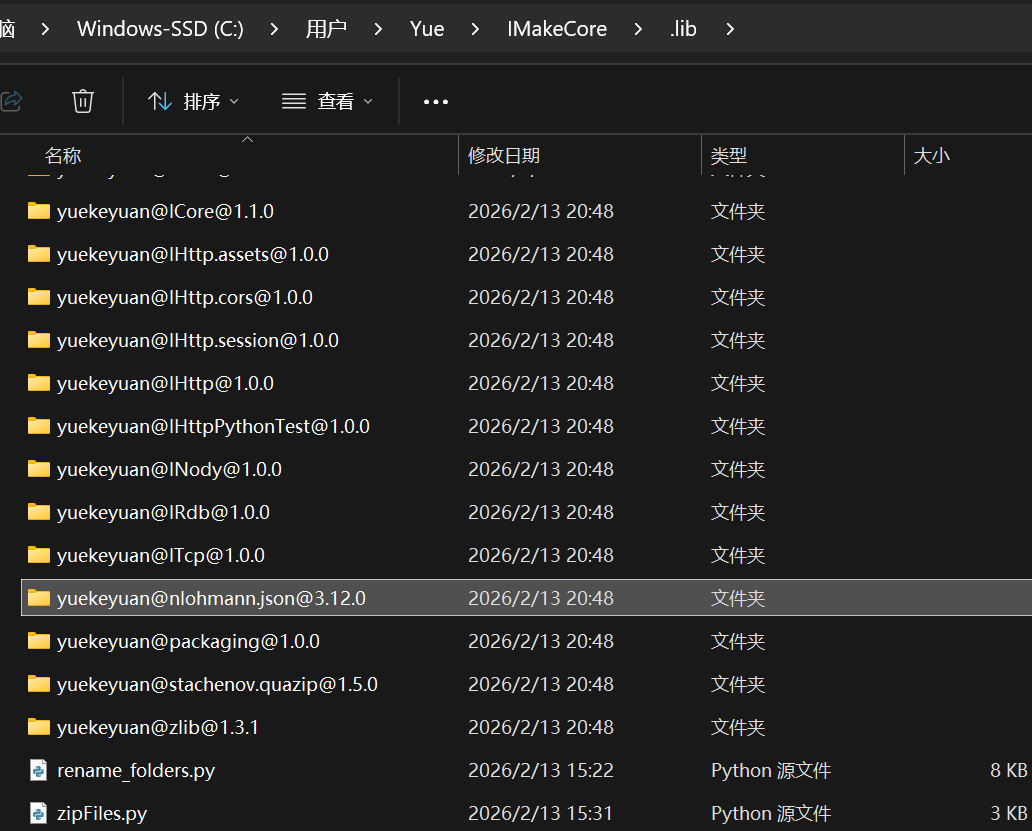
image-20260213215348469


IMakeCore currently supports two project management tools: qmake and cmake.


Using IMakeCore with qmake

Let's create a new qmake project. This is a simple qmake project with nothing else. Its directory structure is as follows:
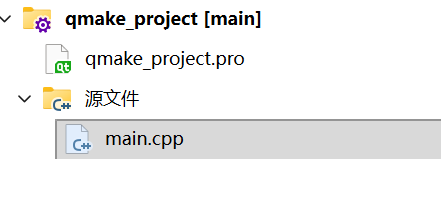
image-20260213220302776

The file contents are as follows:

1
2
3
4
CONFIG += c++11

SOURCES += \
    main.cpp
1
2
3
4
int main()
{
    return 0;
}

Now we have a default project. Next, we will integrate IMakeCore into this project. There are two ways to integrate IMakeCore: automatic integration and manual integration.

Automatic Integration of IMakeCore

The ipc tool has an init subcommand. Open a command-line tool in the directory of the qmake_project.pro file and execute the ipc init command. The command output is as follows:

D:\code\project\IDemo\qmake_project>ipc init

 _____  _    _        _      _____
|_   _|| |  | |      | |    /  __ \
  | |  | |  | |  ___ | |__  | /  \/  ___   _ __  ___
  | |  | |/\| | / _ \| '_ \ | |     / _ \ | '__|/ _ \
 _| |_ \  /\  /|  __/| |_) || \__/\| (_) || |  |  __/
 \___/  \/  \/  \___||_.__/  \____/ \___/ |_|   \___|

add imake support succeed

The last line of the command output, add imake support succeed, indicates that IMakeCore has been integrated into the project. At this point, the project's contents have also changed. Run qmake again, and the project's contents will be updated to:
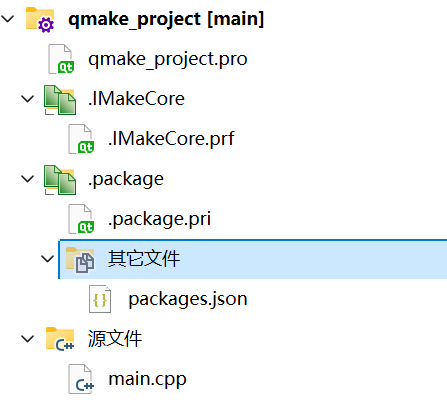
image-20260213222537627

The directory contents are as follows:

image-20260213223207472

The project contents are as follows:

1
2
3
4
5
6
7
8
CONFIG += c++11

SOURCES += \
    main.cpp

include($$(IQMakeCore))
IQMakeCoreInit()
include($$PWD/.package.pri)
1
2
3
4
int main()
{
    return 0;
}
1
2
3
4
5
{
    "packages":{

    }
}
1
2
3
4
5
6
###################################
# SYSTEM CONFIGURED, DO NOT EDIT!!!
###################################

# inclue packages.json to project
OTHER_FILES += packages.json 

The project has now integrated the IMakeCore content. Next, let's add the nlohmann.json library to this project. Modify the packages.json file to include the following content:

1
2
3
4
5
{
    "packages":{
        "nlohmann.json" : "3.12.0"
    }
}

We have only added one line: "nlohmann.json" : "3.12.0". This integrates the nlohmann.json library into the project.

Run qmake again, and the project will now look like this:
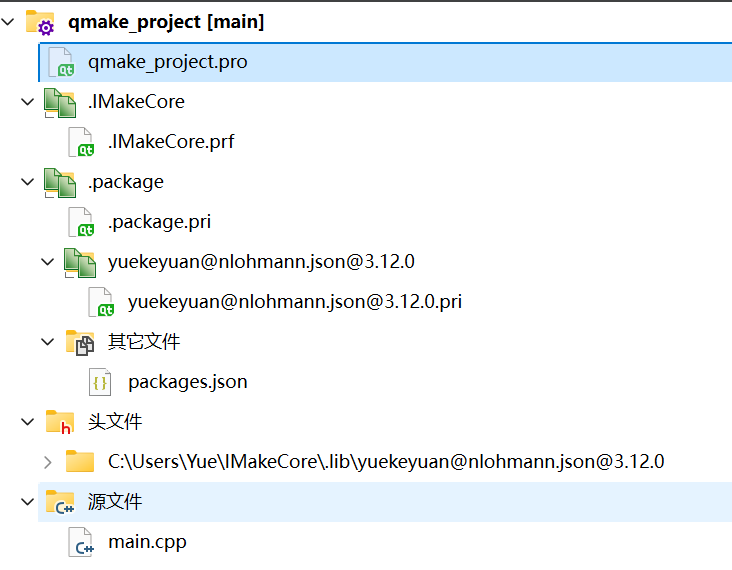
image-20260213223906333

The nlohmann.json library is now in the project.

Manual Integration of IMakeCore

In addition to the ipc init command, users can also manually integrate IMakeCore by copying the following content into the project's .pro file:

1
2
3
include($$(IQMakeCore))
IQMakeCoreInit()
include($$PWD/.package.pri)

After running qmake, IMakeCore is also integrated into the project. Subsequently, users can simply add the required libraries in the packages.json file.


Using IMakeCore with CMake

Integrating IMakeCore into CMake is the same as with qmake. Users can use the ipc init command or integrate it manually. The content of the CMakeLists.txt file is as follows:

cmake_minimum_required(VERSION 3.16)

project(cmake_project LANGUAGES CXX)

add_executable(cmake_project main.cpp)

include(GNUInstallDirs)
install(TARGETS cmake_project
    LIBRARY DESTINATION ${CMAKE_INSTALL_LIBDIR}
    RUNTIME DESTINATION ${CMAKE_INSTALL_BINDIR}
)

include($ENV{ICMakeCore})
ICMakeCoreInit(cmake_project)

The content for CMake differs from qmake:

include($ENV{ICMakeCore})
ICMakeCoreInit(cmake_project)

Here, the ICMakeCoreInit function requires the project name as an argument.

Except for the differences in CMakeLists.txt, the configuration is consistent with qmake projects and will not be explained further.


Using nlohmann.json

Now that IMakeCore integration is complete and the nlohmann.json library is in the project, let's modify the main.cpp file for both the cmake_project and qmake_project as follows:

#include <iostream>
#include <json.hpp>

int main()
{
    using namespace nlohmann;
    auto data = json::array();
    data.push_back(1);
    data.push_back("hello");
    data.push_back(true);
    data.push_back({1,2,3});

    std::cout << data.dump(4);
}

The content here is not about what is output, but rather the line #include <json.hpp>, which truly integrates the nolhmann.json library. There should be no errors.

The project's output is as follows:

[
    1,
    "hello",
    true,
    [
        1,
        2,
        3
    ]
]

The output is correct.


Download

These examples can be downloaded as follows. After downloading, you can compile and run them directly.

cmake_project

qmake_project