Using Example 2: IHttp Static File Service
This document describes how to use IHttp's static file service.
In the previous document, we integrated the nlohmann/json library as an example. This document continues with a small demo, writing a static HTTP file server with minimal code.
Configure Dependencies
First, create a project supported by IMakeCore. The project name is staticMapping_demo. Add IMakeCore support by running ipc init.
pro File
The content of the project's .pro file is as follows:
The changes to this file compared to the original are as follows:
- Removed redundant configurations and comments for clearer documentation.
- Added support for the
_WIN32_WINNTmacro. Without this macro, the asio library may generate warnings when compiled with Mingw. - Added support for the
ws2_32andmswsocklibraries. - These libraries are optional for MSVC compilers but are required for Mingw and LLVM compilers.
- Added IMakeCore support, which is the last three lines of code.
packages.json Configuration
After running qmake, the packages.json file is generated. We now add some libraries to this file.
Modify the packages.json file as follows:
The six libraries added in this packages.json are:
- ICore: This library is the foundation of the IWebCore framework, supporting features such as reflection, configuration, and runtime management.
- nlohmann.json: A JSON library chosen for the IWebCore project, balancing performance and usability.
- asio: A fundamental network library.
- ITcp: A layer built on top of asio for managing TCP content.
- IHttp: The HTTP service package.
- IHttp.assets: This library is the static file service we will use today.
After executing qmake on the project, the screenshot of the project is as follows:
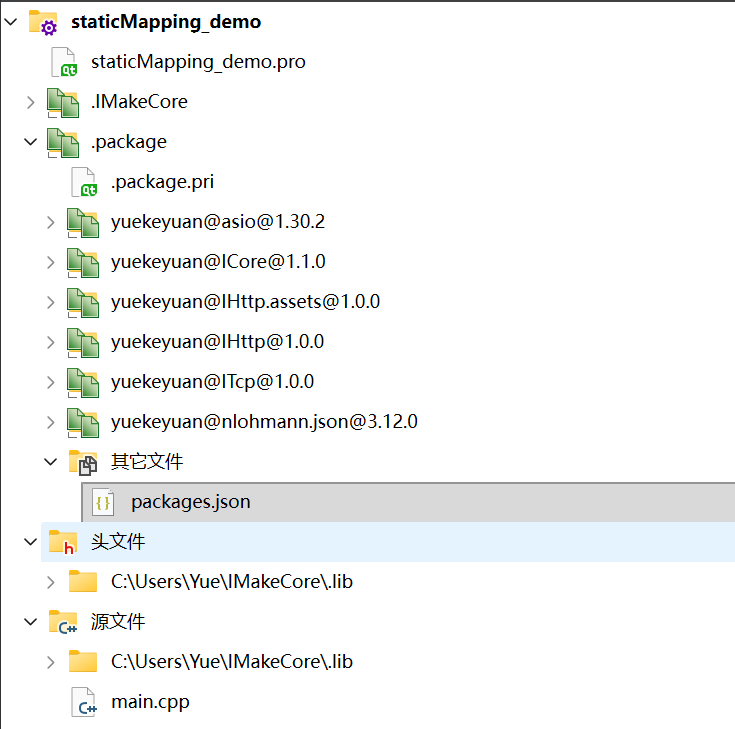
In the screenshot, we see the six libraries used, along with paths such as C:\Users\Yue\IMakeCore\.lib, which points to the location of the code for these six libraries.
Writing a Static File Server
Start a Server
Modify the main.cpp file as follows:
In this file, we include the IApplication.h header file and create an instance of IApplication. The IApplication class serves a similar purpose to QApplication in Qt, providing additional encapsulation.
Next, we include the IHttpServer.h header file and create an instance of IHttpServer. This instance is used to create an HTTP server.
When we run the project, the output is as follows:
First, we see the IWebCore banner.
"IWebCore::IHttpDefaultAssets" is not registered due to its invalid is a warning because we added the IHttp.assets library but did not use it. This warning will disappear after we use the library.
The last line confirms that the server has started on port 8550. We can test it with a curl request:
The server returns a 404 Not Found status with the content IWebCore::IHttpNotFoundInvalid. This is because no content has been defined, so the server defaults to returning a 404.
Add Static File Service
Modify the main.cpp file again as follows:
We added three lines of code to this file.
First, we included the IHttpAssetsAnnomacro.h header file. Then, we added two lines before the main function:
These two lines are macro annotations, similar to annotations in Java. The first line enables the static file service, and the second line sets the path for the static file service.
The path we set here is the runtime directory of the program. Developers can modify it to any valid path, including Qt resource paths.
In addition, we create an index.html file in this directory:
Now, the output is as follows:
The previous warning about IHttp.assets is gone.
Now, let's request the URL again:
We also request another URL:
Both requests return the expected content. The static file service is now running.
Notes
If the response is not as expected, it might be because the index.html file is placed in the wrong directory. In this case, check the runtime directory of the project. Alternatively, you can specify an absolute path.